The purpose of this lab is to practice using arrays, and see how they can be used in parallel programming. As you walk through this lab there will be several questions for you to answer. This text file is a compilation of the questions asked. Download the file; then when you encounter a question in the lab find the corresponding question in the text file and answer it. When you are done, turn in your code and the completed answer file.
We will be writing a program to find amicable pairs. An amicable pair is two numbers such that the sum of the numbers that will evenly divide the first equals the second, and vice versa. (Note that you do not include the numbers themselves in the sums.) For example, 220 and 284 is an amicable pair because if you add up all the numbers that will evenly divide 220 (except for 220 itself), you get:
1 + 2 + 4 + 5 + 10 + 11 + 22 + 44 + 55 + 110 = 284
Similarly, if you add up all the numbers that will evenly divide 284 (except for 284 itself), you get
1 + 2 + 5 + 71 + 142 = 220
Note that some numbers form an amicable pair with themselves. For example, if you add up all the numbers that will evenly divide 6 (except for 6 itself) you get:
1 + 2 + 3 = 6
Such numbers are called perfect numbers.
Our goal is to find all amicable pairs less than 100,000. There are several different ways we might find amicable pairs; however, we are going to choose an algorithm that makes use of an array.
Create an array named sum with 100,000 slots. Now we will
calculate amicable pairs in two steps:
sum[12] should contain the number
16, since if you add up all the factors of 12 you get:
1 + 2 + 3 + 4 + 6 = 16
This step will require nested for loops: one to count up to 100,000, and one to check for all the numbers that will evenly divide the number we're looking at. Here is some pseudocode:
For each number i from 1 up to but not including 100,000
    Set sumi to 0
    For each number j from 1 up to but not including i
        If j will evenly divide i
            then add j to sumi
sum[220] has the
value 284, and sum[284] has the
value 220, we'll know that they are amicable pairs.
Make sure that you avoid array out of bounds exceptions when
checking the second number (i.e. when sum[i] >
100000) and that you only print out each amicable pair once.
We can handle both of these potential errors by only considering the
pair if i > sum[i]. Here is some
pseudocode:
For each number i from 1 up to but not including 100,000
    Let j be sumi
    If i ≥ j
        If sumi = j and sumj = i
            Report i and j as an amicable pair
Note that your program may take a minute or two to run, and you won't
get any output until the very end. Make sure you run the program
without debugging so that you get the Press any key to
continue...
message at the end; otherwise, the screen will
disappear before you can see the output. You should find 17 amicable
pairs between 1 and 100,000, four of which are perfect numbers.
You may notice that this program is kind of slow. The part that takes the longest is the nested loop where we add up the sum of all the factors. (You may remember that any nested loop results in a O( n2 ) algorithm.)
Before we improve the efficiency of our program, let's add some code to time how long it takes. We can do this using the time functions from the C standard library. Add this header file to your program:
#include <ctime>
Now add the following code just before the nested for loop:
time_t start= time( NULL );
And add the following code just after the nested for loop:
time_t stop= time( NULL );
cout << "Total time: " << stop - start << " seconds\n";
Now recompile and execute your program.
By default, programs written in C++ run in a linear fashion: we don't move on to the next step until we've finished the current step. This means that even if you have a multiple processors only one processor can be working on your program at a time. (Note that if you have a multi-core CPU you effectively have multiple processors.)
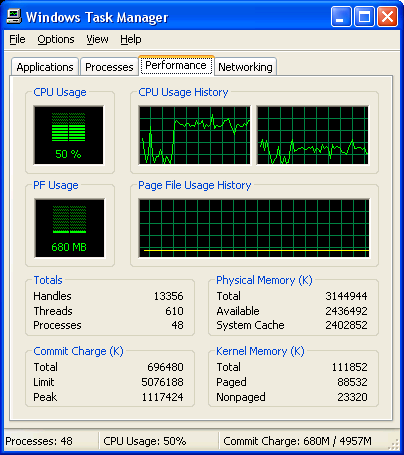
You can see how your program is making poor use of the processor by opening up the Windows Task Manager. To open this, right click on the Windows task bar (at the bottom of the screen) and choose the option that says Task Manager. This will show you a graph representing how much each processor is being utilized. Notice that when you run your program, one processor goes up fairly high, but the other processor stays down.
There is no reason that both processors could not be working on adding up factors at the same time. For example, one processor could be adding up all the factors of 20,000 while the other processor is working on the factors of 80,000. The two jobs are completely independent of one another, and could be going on at the same time.
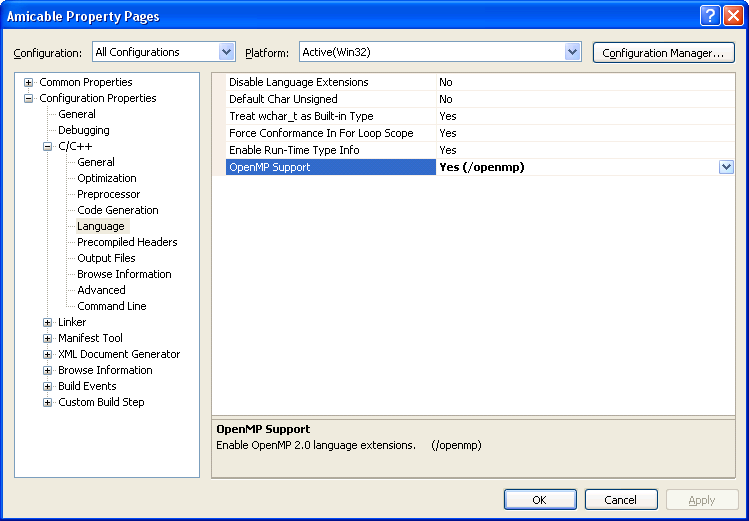
In order to allow parallel execution, we first have to enable it in the compiler. Click on the menu labeled Project, then click the last item that reads Project NameProperties In the tree on the left choose Configuration Properties → C/C++ → Language. Then set the option labeled OpenMP Support to Yes.
Now add the following header file to your program:
#include <omp.h>
And then put the following line immediately before your nested for loop:
#pragma omp parallel for
Note that this should be on its own line, not part of the for loop.
This special instruction tells the compiler that this for loop should be broken into sections and shared over all the available processors. Now recompile and execute the program. Notice the Windows Task Manager as your program runs; you should be making good use of both processors now.
Note that, although we got some speed improvement, it was not nearly
twice as fast as the previous time. This is because by default the
compiler just splits the for loop in two, then gives the
first half to the first processor and the second half to the second
processor. The problem with that is that the first half has all the
small numbers and the second half has all the big numbers; thus, the
second half is much slower.
We can get better performance by allowing the two processors to work back and forth. For example, let the first processor take the first 100 numbers, the second processor take the second 100 numbers, the first processor take the third 100 numbers, the second processor take the fourth 100 numbers, and so on, back and forth. That way both processors get some smaller numbers and some larger numbers. This is called scheduling.
Edit the line just before the nested for loop so that it looks like this:
#pragma omp parallel for schedule( static, 100 )
Now recompile and execute your program.
This program is an unusually good choice for parallel execution because each calculation is completely independent—it's almost embarrassingly parallel. Not every for loop is a good candidate for parallelization. For example, add the following line immediately before the for loop that prints out the pairs:
#pragma omp parallel for
Now recompile and execute your program.
The real challenge in parallel programming, then, is finding tasks that can be shared between processors and coordinating their efforts.